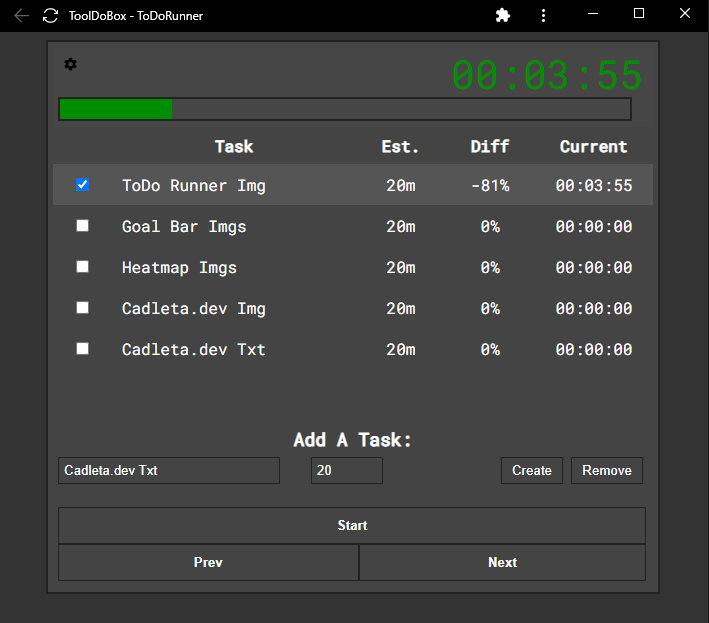
What It Does
- Race against your own time estimates for each task
- See live percentage difference showing if you're ahead or behind schedule
- Navigate between tasks with keyboard shortcuts or click navigation
- Get audio warnings when you exceed your estimated time
- Track cumulative performance across your entire task list
- Save your task lists between sessions with automatic localStorage persistence
- Use timestamp-based timing to eliminate stopwatch drift
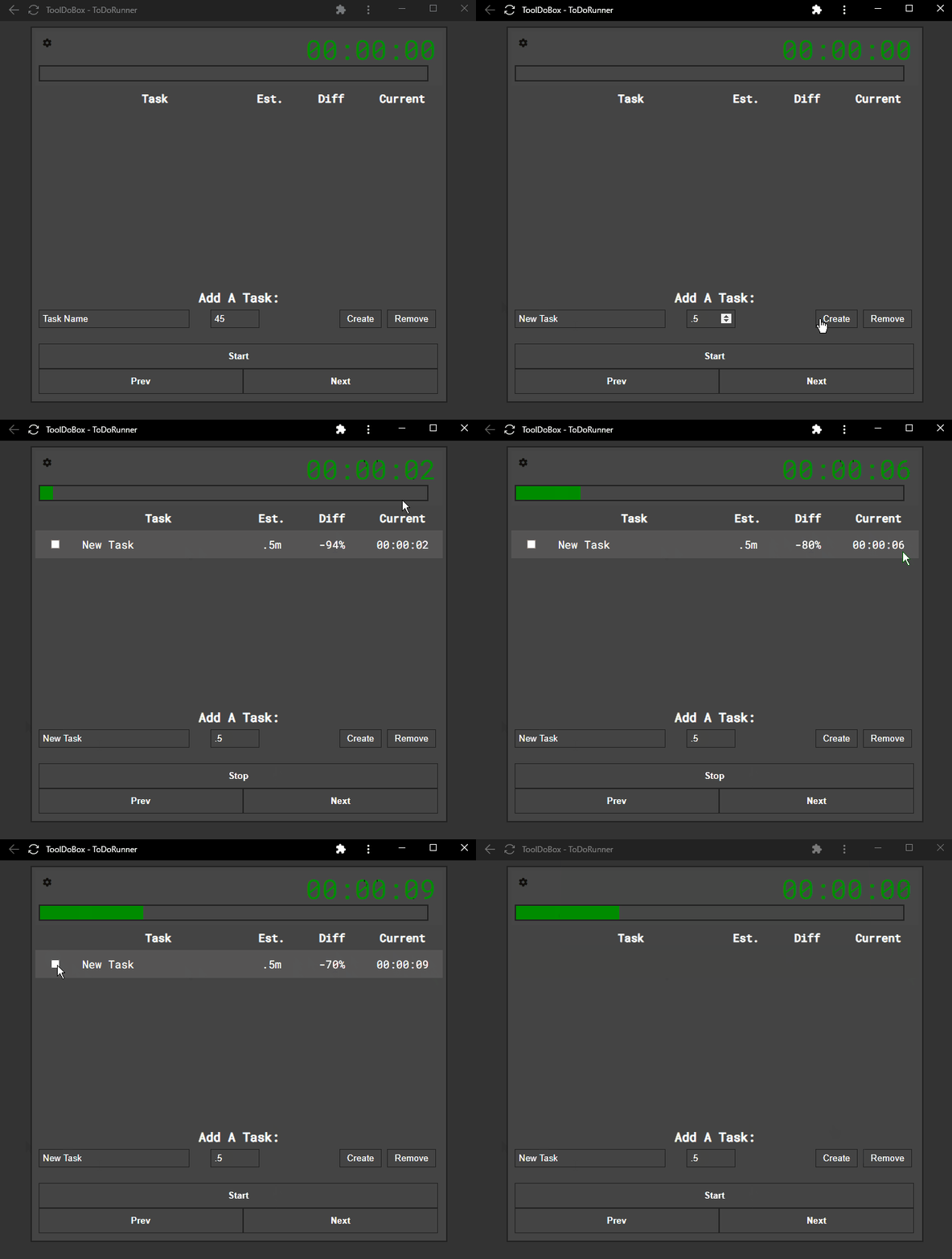 Live timer shows real-time performance: green means you're ahead of your estimate, red means you're falling behind.
Why I Built This
I've always been fascinated by speedrunning—watching someone optimize every second of a game, racing against their personal best with split times showing exactly where they're gaining or losing time. The live feedback creates incredible focus and motivation. I thought: what if I could bring that same energy to my todo list?
Traditional todo lists just tell you what's done and what's not. They don't capture the "am I working efficiently right now?" question. I wanted a tool that would give me speedrunner-style splits for my tasks—estimate times upfront, then race against those estimates with live feedback on whether I'm ahead or behind pace.
I studied popular speedrunning split timers and combined concepts from my Productivity Bar project. The result is a todo list that turns task completion into a performance game, where beating your estimates feels like setting a new personal record.
How It Works
ToDo Runner is built with vanilla JavaScript and uses localStorage to persist your task lists between sessions. When you add a task, you provide both a description and an estimated completion time. Click start on a task, and the app launches a live stopwatch that compares elapsed time against your estimate in real-time.
The timer uses Date.now() timestamp deltas instead of simple interval counting, which eliminates the drift that accumulates in traditional setInterval-based stopwatches. As you work, the app calculates your percentage difference—green if you're ahead of schedule, red if you're behind. When you approach or exceed your estimate, audio cues alert you without breaking focus.
Navigation is keyboard-optimized: you can jump to the next task, previous task, or click directly on any task in the list. All state—tasks, times, completion status—saves automatically to localStorage, so you can close the browser and pick up exactly where you left off.
Impact
By the numbers:
- Part of the ToolDoBox suite, used personally since February 2022
- Integrated with 7 other productivity tools in a cohesive offline toolkit
- Zero backend infrastructure—runs entirely client-side with full offline capability
What changed:
- Made task estimation tangible—I'm now much better at predicting how long work actually takes
- Turned boring task work into a challenge—beating estimates feels genuinely rewarding
- Increased focus during tasks—the live timer creates urgency similar to speedrunning
- Revealed hidden time sinks—seeing which tasks consistently overrun taught me where I underestimate
Challenges & Solutions
The biggest technical challenge was stopwatch drift. Early versions used setInterval(1000) to tick every second, but JavaScript timers aren't perfectly accurate—they can lag when the browser tab loses focus or the system is under load. After a 30-minute task, the timer could be off by several seconds.
I solved this by switching to timestamp-based elapsed time: record Date.now() when the task starts, then on every interval, calculate elapsed = Date.now() - startTime. This anchors the timer to system time instead of interval counting, eliminating drift entirely. The display always reflects true elapsed time, even if individual intervals fire late.
The second challenge was balancing feedback intensity. Too many audio alerts become annoying; too few and you lose the benefit. I settled on a single warning tone when you approach your estimate, then periodic chimes if you significantly overrun. This keeps you informed without breaking flow.
What I Learned
I learned that gamification works best when the game mechanics align with real goals. Speedrunner splits work because beating your time genuinely means you worked more efficiently. Arbitrary points or badges feel hollow by comparison. I also learned that accurate time estimation is a skill that improves dramatically with live feedback—the tool trained me to be realistic about task duration.
Technically, I learned the importance of timestamp-based timing for any long-running JavaScript timer, and how localStorage can provide robust offline persistence without backend complexity. Most importantly, I learned that simple tools you build for yourself—tools that solve a real friction point in your workflow—are the ones you'll actually keep using.
Future improvements:
- Add task reordering and inline editing for faster adjustments
- Implement historical analytics to track estimation accuracy over time
- Support negative timers for tasks without estimates (pure stopwatch mode)
- Add cloud sync for multi-device use while preserving offline-first operation
- Create "personal best" tracking per task for repeated workflows
Links
- Live Demo: tooldobox.com/apps/run/todorunner
- Code: github.com/cadleta/ToolDoBox
- Related: Productivity Bar (time-boxing tool), Goal Bar (long-term goal tracking)